Skip to main content
English (US)
አማርኛ
English (LU)
Français
Shqip
Submit a request
Sign in
English (US)
አማርኛ
English (LU)
Français
Shqip
Moderator Sushant
Get 5 Star Reviews
My Reviews
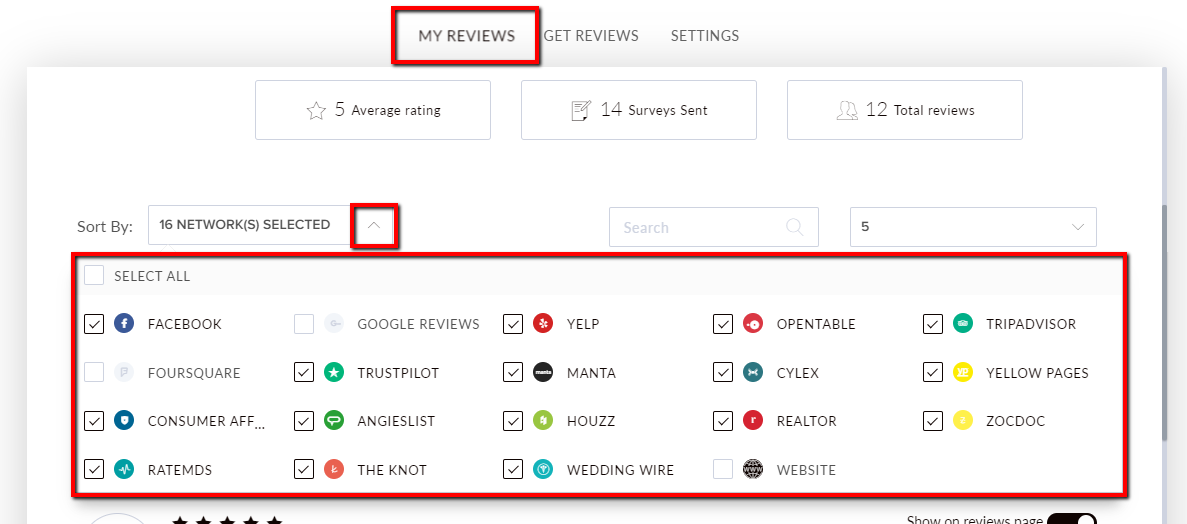
How do I sort my reviews by platform?
Sushant Awalekar
September 21, 2021 10:43
To view your reviews, select the
Get 5 Star Reviews
tile.
Navigate to the
My Reviews
tab. Select the social media icons to filter your reviews. Click to enable an icon to view the reviews on that platform.
Articles in this section
New Test Article floww slug
Article floww 2 3 4 5
Test 3
What happens when I connect a platform in Get 5 Star Reviews?
How do I filter survey recipients by the date their survey is scheduled and view my scheduled surveys?
What can I do on the My Reviews tab?
How do I sort my reviews by star rating?
How do I sort my reviews by platform?
How do I share a review on social media?
How do I respond to a review?
See more
Was this article helpful?
Yes
No
0 out of 0 found this helpful
Comments
0 comments
Please
sign in
to leave a comment.
Have more questions?
Submit a request
Share it, if you like it.
Powered by Zendesk

Comments
0 comments